
Today we're launching Vivoh Pulse, a live view of Zoom meeting quality for a whole firm. It reads Zoom's own Dashboard data minute by minute and answers the question every IT team gets several times a day: why does this person's Zoom keep breaking up?
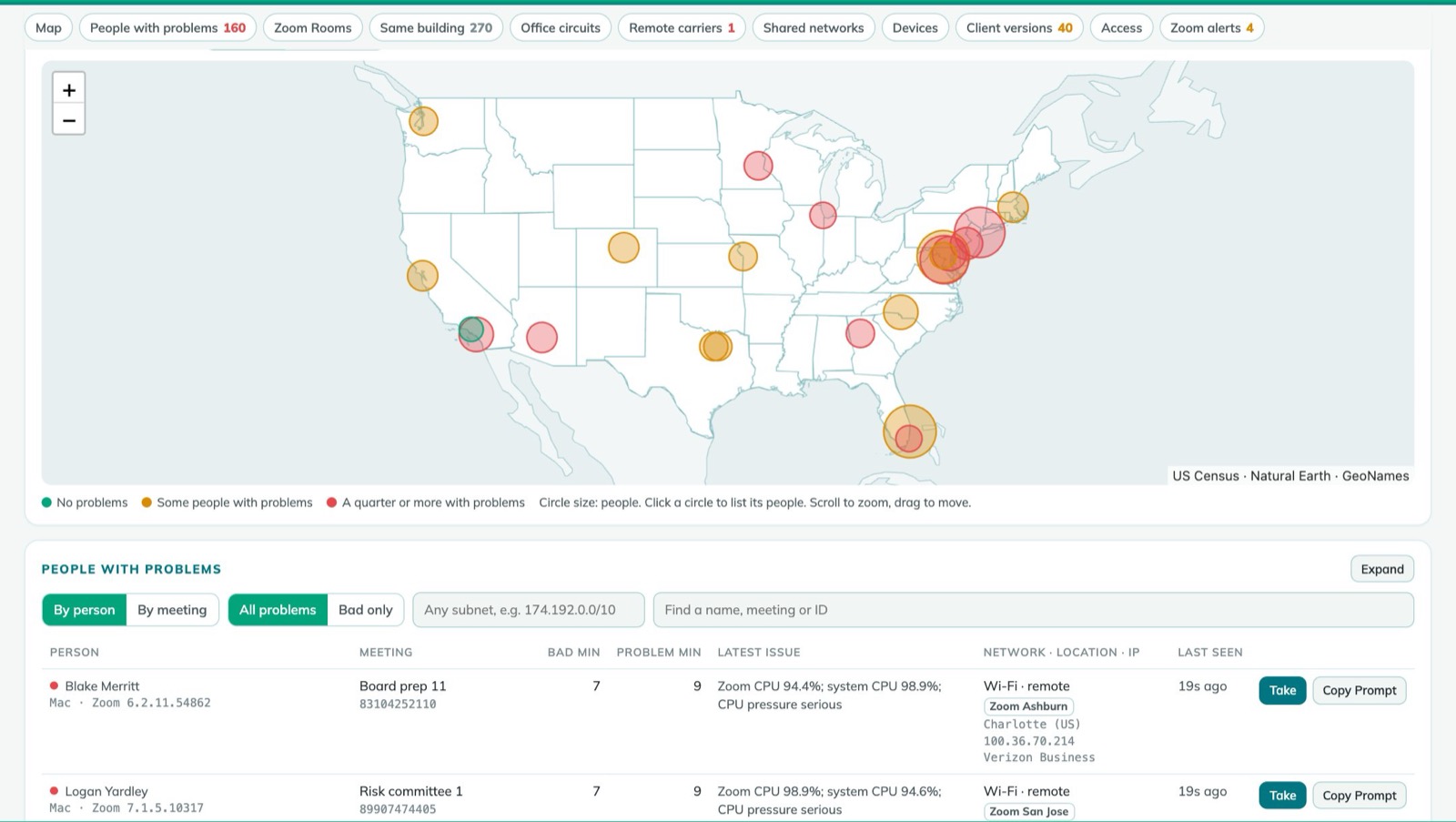
Who is struggling, where, and why
Zoom already measures every participant's packet loss, latency, jitter and CPU each minute. Vivoh Pulse turns those readings into one page:
- A map of where people are, coloured by how many of them have problems.
- The people with problems, worst first, with the likely reason: their Wi-Fi, their home internet provider, a VPN or security proxy, an office circuit, or their own computer running out of CPU.
- Office internet circuits with their Zoom load over the last half hour, so a full circuit shows up before the complaints do.
- Zoom Rooms, carriers by state, shared networks, devices and Zoom client versions, with older releases marked.
Copy Prompt: the whole story for an LLM
Next to every person and every meeting is a Copy Prompt button. It copies everything Zoom recorded about them, including their device, network, minute-by-minute readings and how everyone else in the meeting did, as one prompt. Paste it into an LLM such as Claude or ChatGPT and you get a plain-language diagnosis and the one thing to try first. The model sees only the readings you hand it.
Built for the team that fixes it
Take tells the rest of the team you're on it, and Resolved closes it out. At the end of each day, the service writes a daily report for the admin: who had problems, who took them and how long each took to fix.
New this week
- VIP View. Upload a list of email addresses and switch the whole dashboard to just those people, so the meetings that matter most are never lost in the crowd.
- Split tunnel check. For people on the VPN, Vivoh Pulse shows whether Zoom's audio and video go straight out (split tunnel) or through the VPN (full tunnel).
- Local IP. The laptop's own address, as Zoom shows it, sits beside the public one: a home router, an office range or the VPN's pool tells you at a glance where someone is.
- A faster dashboard. The numbers and the map appear first, and the details follow a moment later.
- Calmer ratings. Zoom repairs lost video packets and quietly lowers the picture quality, so short video blips no longer raise alarms. Audio problems, which people do notice, are still flagged straight away.
Private by design
Vivoh Pulse keeps only today's readings. At midnight they are deleted, and names and addresses are encrypted while they're held. The access it needs from Zoom is read-only.
Two ways to run it
Vivoh Pulse runs as a hosted service, a separate one for each firm, with sign-in through your own Microsoft accounts. Or you can run it yourself as a single program on a server of your own, with nothing to install alongside it.
See it
There's a short video, a slide deck, a sample weekly report and a click-through tour at pulse.vivoh.com. To try it on your own Zoom account, contact us.